Navigating
Every view lists the keys it supports in the footer, and ? opens the full
help (scroll it with j/k). The tables below are the reference.
Keys
Moving around
| Key | Action |
|---|---|
j / k, ↓ / ↑ | Move the selection, or scroll a text view |
Ctrl+f / Ctrl+b, PgDn / PgUp | Page down / up |
Enter | Open the selected item (detail, workload, graph node, event’s object) |
Esc / q | Go back to where you came from; at the top, asks before quitting |
Backspace | Go back, without the quit prompt |
: | Command mode (Tab autocompletes) |
/ | Filter a list, or search a text view |
0–9 | Switch to a namespace hotkey |
? | Show / hide help |
Q, Ctrl+C, :q | Quit immediately |
A thin bar on a view’s right border shows that it scrolls and where you are.
Acting on a Flux resource
| Key | Action |
|---|---|
s / r | Suspend / resume reconciliation |
R | Reconcile |
W | Reconcile with its source |
Ctrl+d | Delete (asks first) |
e | Edit in your editor |
y / d | YAML / describe |
g | Graph |
t | Trace what manages it |
h | Reconciliation history |
v | HelmRelease effective values |
f | Toggle favorite |
Shift+N / A / T / S | Sort by name / age / type / status |
See Flux Resources for what each operation applies to. Writes ask for confirmation where it matters and are blocked in read-only mode.
In specific views
| Key | Where | Action |
|---|---|---|
n / N | YAML, describe, trace, logs, values | Next / previous search match |
l | Workloads, :deploy, :po | Stream pod logs |
r | Workloads, :deploy | Rollout restart |
Ctrl+d | Workload detail, :po | Delete a pod (its controller replaces it) |
c | Logs | Switch container |
G | Logs | Jump to the newest line and follow |
x | HelmRelease values | Reveal / hide Secret values |
Commands
Press : and type a command. Tab autocompletes.
| Command | Description |
|---|---|
:ctx / :ctx <name> | Pick or switch the Kubernetes context |
:ns / :ns <name> / :ns all | Pick or switch the namespace, or watch all namespaces |
:<kind> | Filter the Flux list to a kind (:ks, :hr, :gitrepo, …); with native resources on, browse any kind (:deploy, :po) |
:all | Clear the kind and health filters |
:flux | Back to the Flux list from anywhere |
:healthy / :unhealthy / :suspended | Filter by health |
:favorites (:fav) | Favorite resources |
:events (:ev) | Live Kubernetes events feed |
:pulse (:dashboard) | Cluster health dashboard |
:logs / :logs <pod> | Stream a Flux controller’s logs |
:trace / :trace <kind>/<name> | Trace what manages a resource |
:skin / :skin <name> | Pick or switch the theme |
:native | Toggle native resources for this session |
:discover | Toggle Flux-adjacent CRD discovery for this session |
:readonly | Toggle read-only mode for this session |
:help | Show / hide help |
:q (:quit, :exit) | Quit |
Menus
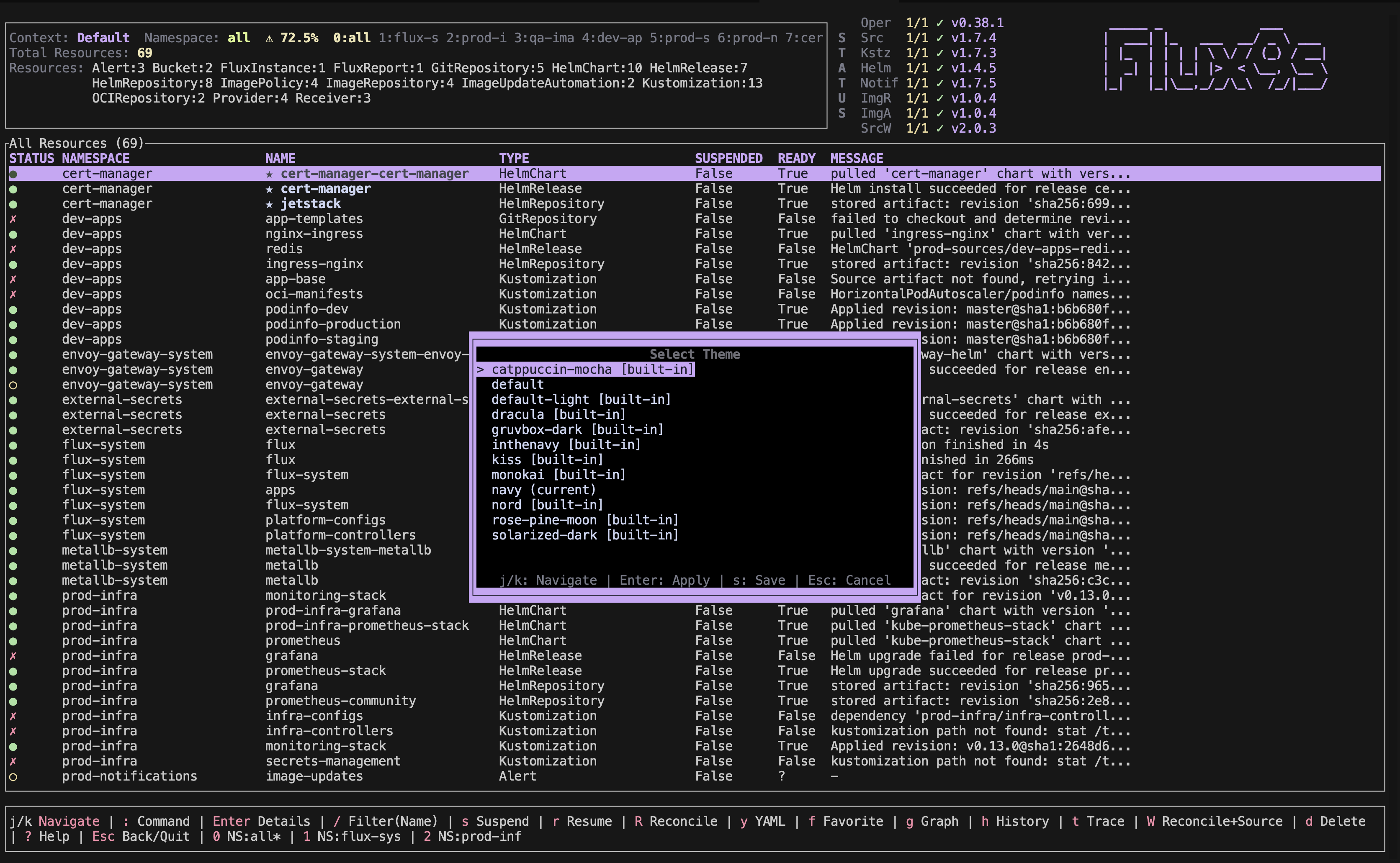
:ctx, :ns, :skin, and :logs without an argument open a searchable
menu. Every menu uses the same keys as the lists: j/k to move, / to
filter (Enter applies, Esc cancels; a second Esc closes the menu),
PgUp/PgDn to page, Enter to pick, and : to jump straight into command
mode. The current choice is marked (current).
- Context (
:ctx) — switching starts fresh on the new cluster: watchers restart, namespace hotkeys and the namespace list are re-discovered, and views showing an object from the old cluster return to the Flux list. - Namespace (
:ns) —allfirst, then namespaces holding Flux resources (marked◆ flux). With native resources on, it lists every namespace in the cluster, and fills in place if it opens before they’ve loaded. If your RBAC can’t list namespaces, it shows the Flux namespaces. - Theme (
:skin) — themes preview live as you move.Enterapplies for this session;ssaves to your config (ui.skin, orui.skinReadOnlyin read-only mode).Escrestores the original. 17 themes are built in.
Filtering and sorting
- By name:
/then type;Enterkeeps the filter,Escclears it. - By kind:
:ks,:hr,:gitrepo, … (Tablists them all).:allclears it. - By health:
:healthy(ready, not suspended),:unhealthy(not ready or suspended),:suspended.:allclears it. - Sorting:
Shift+N(name),Shift+A(age),Shift+T(type), orShift+S(status, problems first). Press again to reverse, a third time to restore the default order. Favorites stay at the top.
The header’s health indicator summarises the list: green ● at 90% or more,
yellow ⚠ from 70%, red ✗ below.

Searching text views
In YAML (y), describe (d), trace (t), logs, and HelmRelease values, /
searches instead of filtering: type a query and press Enter to jump to the
first match (case-insensitive), n/N for the next / previous one, and
Esc to clear it. The title shows the query and position, e.g.
/spec (2/7).
When the connection drops
flux9s watches the cluster continuously. If the API server becomes unreachable (VPN reconnect, laptop sleep), a red banner appears top-right:
⚠ Watch degraded (N) — data may be stale, reconnecting...
Watches retry with backoff and the banner clears when they recover. A list whose first load stalls says so after 10 seconds and retries.