Theme/Skin System Documentation
Overview
The flux9s theme system allows you to customize the appearance of the TUI by loading color schemes from YAML files. Themes follow the k9s skin format for familiarity and compatibility.
How It Works
Theme Resolution Order
When loading a theme, flux9s checks in this order:
- User Skins Directory:
$XDG_CONFIG_HOME/flux9s/skins/{name}.yaml(default:~/.config/flux9s/skins/) - Legacy Data Directory:
$XDG_DATA_HOME/flux9s/skins/{name}.yaml(default:~/.local/share/flux9s/skins/) - Embedded Themes: Built-in themes embedded in the binary (17 popular themes)
- Built-in Default: Falls back to hardcoded default theme
Setting a Theme
Via Configuration File
Edit ~/.config/flux9s/config.yaml:
ui:
  skin: dracula
Or use the CLI:
flux9s config set ui.skin dracula
Via Environment Variable
export FLUX9S_SKIN=dracula
flux9s
Via TUI Command
While in the TUI, you can change themes in two ways:
Direct command:
:skin dracula
This changes the theme immediately (temporary, doesn’t persist to config file).
Interactive submenu:
:skin
This opens an interactive theme selection menu with live preview. Navigate with j/k, press Enter to apply, s to save to config, or Esc to cancel.
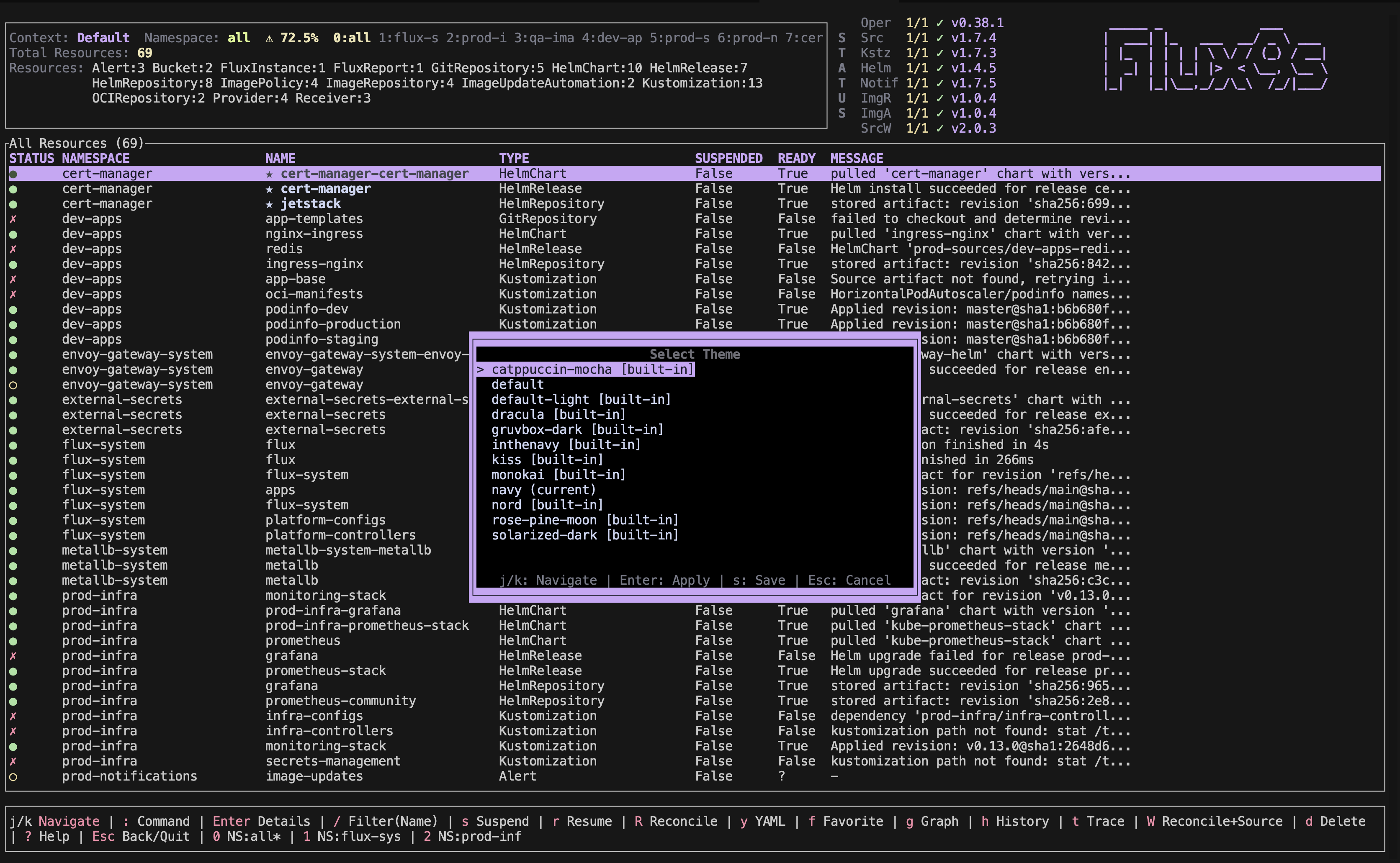
The submenu shows:
- All available themes (embedded + user-installed)
- Current theme marked with “(current)”
- Built-in themes marked with “[built-in]”
- Live preview as you navigate (theme changes immediately)
Theme File Format
Themes use k9s-style YAML format:
k9s:
  body:
    fg: "#ffffff" # Foreground color
    bg: "#000000" # Background color
    logo: "#00ff00" # Logo/ASCII art color

  frame:
    border:
      fg: "#00ffff" # Border color
    menu:
      fg: "#ffffff"
      bg: "#000000"
      key: "#00ff00" # Keybinding color
    crumbs:
      fg: "#ffff00"
      active: "#ffffff"
    status:
      new: "#00ff00" # Success/ready color
      error: "#ff0000" # Error color
    title:
      fg: "#ffffff"
      bg: "#000000"

  views:
    table:
      fg: "#ffffff"
      bg: "#000000"
      cursor:
        fg: "#000000"
        bg: "#ffffff"
      header:
        fg: "#ffffff"
        bg: "#000000"
    yaml:
      key: "#00ffff"
      value: "#ffffff"
    logs:
      fg: "#ffffff"
      bg: "#000000"
Color Format Support
- Hex colors:
#ffffff,#fff(short form) - Named colors:
white,black,red,green,blue,yellow,cyan,magenta,gray - Special:
default(transparent/inherit)
Color Mapping
The k9s skin format is mapped to flux9s Theme fields:
body.fg→text_primarybody.logo→header_asciiframe.border.fg→header_resourcesframe.menu.key→footer_keyframe.crumbs.active→table_selectedframe.status.new→status_readyframe.status.error→status_errorframe.title.fg→header_contextviews.table.fg→table_normalviews.table.cursor.fg→table_selectedviews.table.header.fg→table_headerviews.yaml.key→text_labelviews.yaml.value→text_value
Built-in Themes
flux9s includes 17 popular themes embedded in the binary, so they’re available immediately without installation:
Dark Themes:
dracula- Dark theme with vibrant colorsnord- Arctic-inspired cool colorssolarized-dark- Carefully designed dark thememonokai- Classic dark theme with bright colorsgruvbox-dark- Retro groove color schemecatppuccin-mocha- Warm dark theme with pastel colorsrose-pine-moon- Soft dark theme with muted colorsinthenavy- Navy blue themeone-dark- Popular Atom/VS Code themetokyo-night- VS Code theme with purple/blue tonesayu-dark- Dark theme with warm accentssnazzy- Vibrant terminal themetomorrow-night- Classic dark themepapercolor-dark- Minimal dark themebase16-dark- Base16 dark variant
Light Themes:
default-light- Light theme for bright terminalskiss- Minimalistic theme
Default Theme
The default theme is built-in and uses:
- Yellow for headers and context
- Cyan for resources and labels
- Green for ready status
- Red for errors
- White for normal text
Creating Custom Themes
- Create a YAML file in
~/.config/flux9s/skins/(or~/.local/share/flux9s/skins/for legacy) - Name it
{theme-name}.yaml - Use the k9s format shown above
- Set it with
flux9s config set ui.skin {theme-name}or use the:skinsubmenu in TUI
Implementation Details
Code Structure
- Theme Definition:
src/tui/theme.rs- Defines theThemestruct with all color fields - Theme Loader:
src/config/theme_loader.rs- Handles loading themes from YAML files - Theme Resolution: Checks user dir → system dir → built-in default
- Theme Application: Theme is loaded at startup and can be changed via
:skincommand
Key Functions
ThemeLoader::load_theme(name)- Load a theme by nameThemeLoader::list_themes()- List all available themes (includes embedded + user-installed)App::set_theme(name)- Change theme in running TUIApp::preview_theme(name)- Preview theme temporarily (for submenu)App::persist_theme(name)- Save theme to config fileparse_color(color_str)- Parse color string to ratatui Color
Theme Submenu Features
The :skin command without arguments opens an interactive submenu with:
- Live Preview: Theme changes immediately as you navigate with
j/k - Current Theme Indicator: Shows which theme is currently active
- Built-in Theme Markers: Embedded themes are marked with
[built-in] - Quick Apply: Press
Enterto apply theme temporarily (session only) - Persist to Config: Press
sto save theme to config file (persists across sessions) - Cancel & Restore: Press
Escto cancel and restore original theme
The submenu saves themes to ui.skin in normal mode, or ui.skinReadOnly when readonly mode is enabled.
Current Status
✅ Implemented:
- Theme loading from YAML files
- k9s-style skin format support
- Theme resolution (user → legacy → embedded → default)
- 17 embedded themes built into binary
:skincommand to change themes- Interactive theme submenu with live preview
- Theme persistence to config file
- Config file support (
ui.skin,ui.skinReadOnly) - Environment variable override (
FLUX9S_SKIN) - Context-specific skins
🚧 Future Enhancements:
- Hot-reload on theme file changes
- Better color mapping coverage
- Theme validation and error reporting
- More embedded themes
Troubleshooting
Theme not loading?
- Check file exists in correct directory
- Verify YAML syntax is valid
- Check theme name matches filename (without .yaml)
- Use
--debugflag to see error messages
Colors not applying correctly?
- Some k9s color fields may not map to flux9s Theme fields yet
- Check which Theme fields are actually used in the UI
- Fall back to default theme if needed