Configuration
Configuration File Location
flux9s stores its configuration in a YAML file. The location depends on your operating system:
| OS | Location |
|---|---|
| Linux | ~/.config/flux9s/config.yaml |
| macOS | ~/.config/flux9s/config.yaml |
| Windows | %APPDATA%\flux9s\config.yaml |
Configuration Options
Read-Only Mode
By default, flux9s launches in readonly mode to prevent accidental changes (Delete operations always have a confirmation screen). You can change this:
Via command line:
flux9s config set readOnly false
During a session:
Use the :readonly command to toggle readonly mode.
Readonly mode is enabled by default to prevent accidental modifications to your Flux resources. Only disable it if you need to perform operations.
Favorites
flux9s allows you to mark resources as favorites for quick access. Favorites are stored in your configuration file and persist across sessions.
During a session:
- Press
fon a resource to toggle favorite status - Use
:favoritesor:favcommand to view all favorites
Configuration file:
Favorites are automatically saved to your config file as a list of resource keys in the format resource_type:namespace:name:
favorites:
  - "Kustomization:flux-system:my-app"
  - "HelmRelease:production:nginx"
UI Configuration
Skin Configuration
flux9s supports custom skins to personalize the interface. Skins follow a similar format to K9s but may require adjustments.
Built-in Themes:
flux9s includes 17 popular themes embedded in the binary, including:
- Dark themes: dracula, nord, solarized-dark, monokai, gruvbox-dark, catppuccin-mocha, rose-pine-moon, one-dark, tokyo-night, and more
- Light themes: default-light, kiss
These themes are available immediately without installation. Use the :skin command in the TUI to see all available themes.
Set a skin via command line:
# Set default skin
flux9s config set ui.skin dracula

# Set skin for readonly mode
flux9s config set ui.skinReadOnly rose-pine
Import and set a custom skin:
flux9s config skins set navy.yaml
Interactive Theme Selection:
In the TUI, type :skin (without arguments) to open an interactive theme selection menu:
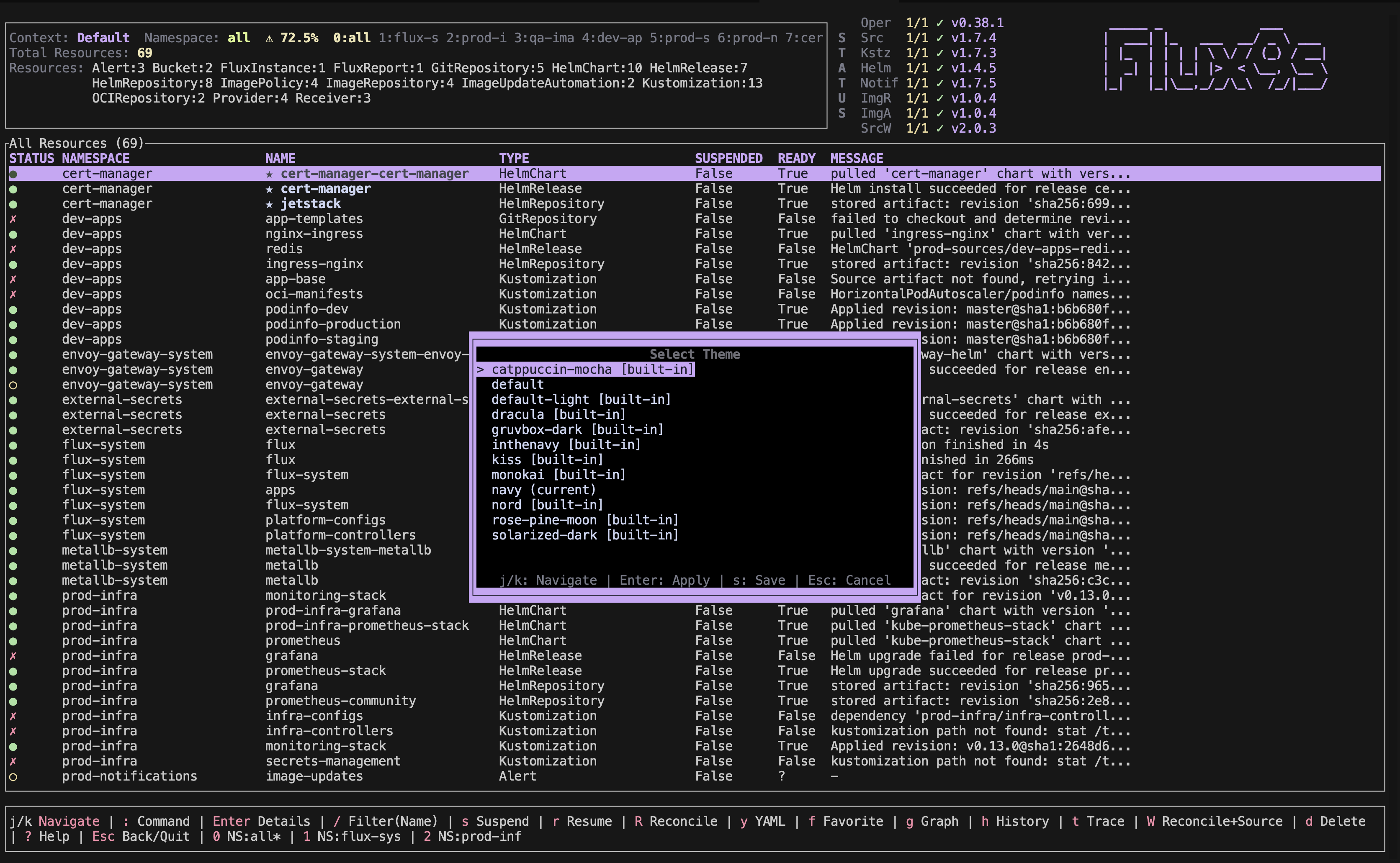
- Navigate with
j/kto browse themes - See live preview as you navigate
- Press
Enterto apply temporarily - Press
sto save to config file - Press
Escto cancel
Custom skins must be placed in your system’s flux9s/skins directory:
- Linux/macOS:
~/.config/flux9s/skins/ - Windows:
%APPDATA%\flux9s\skins\
Not all K9s skins are compatible with flux9s. flux9s skins follow a similar format but may require adjustments to work properly.
Command Reference
Show Help
flux9s config --help
Show all available configuration options.
Set Value
flux9s config set {KEY} {VALUE}
Set a configuration value.
Get Value
flux9s config get {KEY}
Get a configuration value.
Set Skin
flux9s config skins set {skin-file}
Import and set a skin from a YAML file.